What is FrostNav?
FrostNav is a free app installed on the multimedia screen of Chery group vehicles (Tiggo, Omoda, Jaecoo). It projects your map to the instrument cluster, lets you install apps and manages the car's settings from one place.
Where do I start?
- Check that your car is supported: Supported vehicles.
- Follow the install guide step by step: Installation.
- If you get stuck, see the Frequently asked questions.
Features
| Feature | What it does |
|---|---|
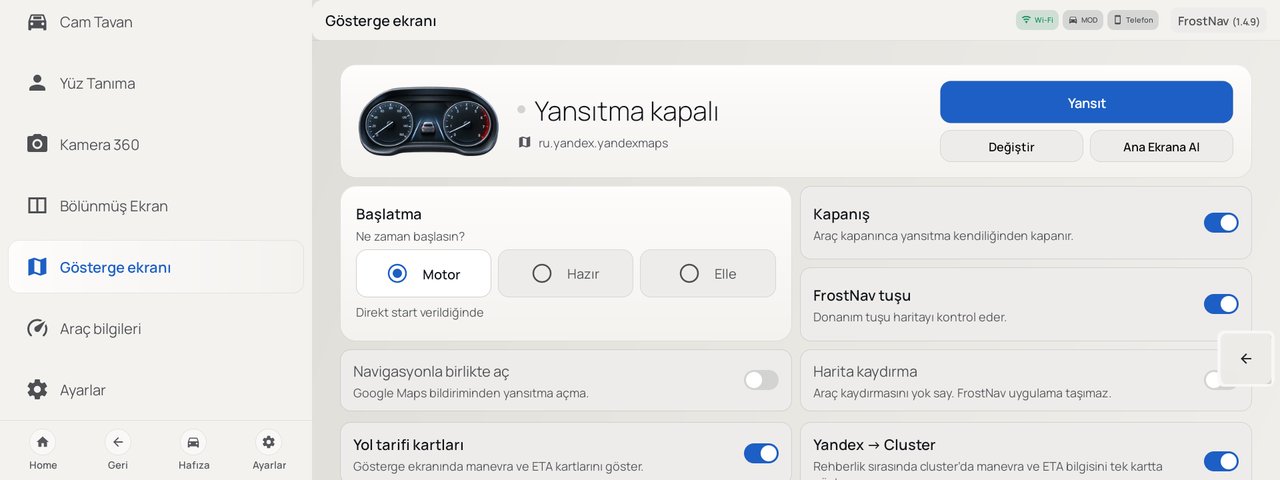
| Projection | Projects an app such as Google Maps or Yandex to the instrument cluster. Starts with the engine, in ready mode or by hand. |
| Full-screen home | Gauges and app shortcuts on one screen. |
| Apps | Install, update, open and remove apps. |
| Transfer | Send files and links from a phone on the same network, keyboard. |
| Wi‑Fi | Scan, connect with a password, forget saved networks. |
| Drive Memory | Restores your chosen drive mode at each start. |
| Welcome | Welcome sound and intro design when the car starts. |
| Sound settings | Five-band equalizer and loudness. |
| Automation | Seat, glass and steering heat from the outside temperature. |
| Sunroof | Roof and shade from light, rain and speed. |
| Face recognition | Recognizes the driver with the DMS camera and applies seat memory. |
| Camera 360 | Live view and recording of the four cameras. |
| Split screen | Opens two apps side by side at a chosen ratio. |
| Vehicle information | Fuel, range, distance and engine data. |
| Settings | Back button, theme, background running. |
| Mobile app | Trips, parking spot, GPS Link and settings backup on your phone. |
Links
- Web installer: frostnav.com/install (Chrome, Edge or Opera)
- Member panel and
adbauth.key: platform.frostnav.com - Mobile app: App Store · Google Play
- Install video: YouTube